CertAlert – Technical Specifications
Self-contained certificate monitoring for enterprise environments
CertAlert is a self-contained, enterprise-grade TLS/SSL certificate discovery, validation and monitoring tool designed for security and operations teams. This reference page details supported protocols, report formats, certificate and connection statuses, and CSV export fields for technical evaluators assessing capabilities and integration options. CertAlert runs locally with no external dependencies, making it suitable for restricted, offline, or security-sensitive environments.
Prevent Costly Outages
Receive timely alerts when certificates need renewal, preventing unexpected service disruptions that impact operations and revenue
Agentless Discovery
Save valuable time by automating certificate discovery and monitoring across your entire network infrastructure
Reduce Costs
Lower your certificate management overhead and eliminate the expense of emergency fixes for expired certificates
Maintain Trust
Protect your brand reputation by preventing the security warnings and errors caused by expired certificates
- Self-Contained: No external dependencies or cloud services required
- Network Discovery: Scan by IP ranges, CIDR blocks, or hostname lists
- IPv4 and IPv6: Full dual-stack support for modern networks
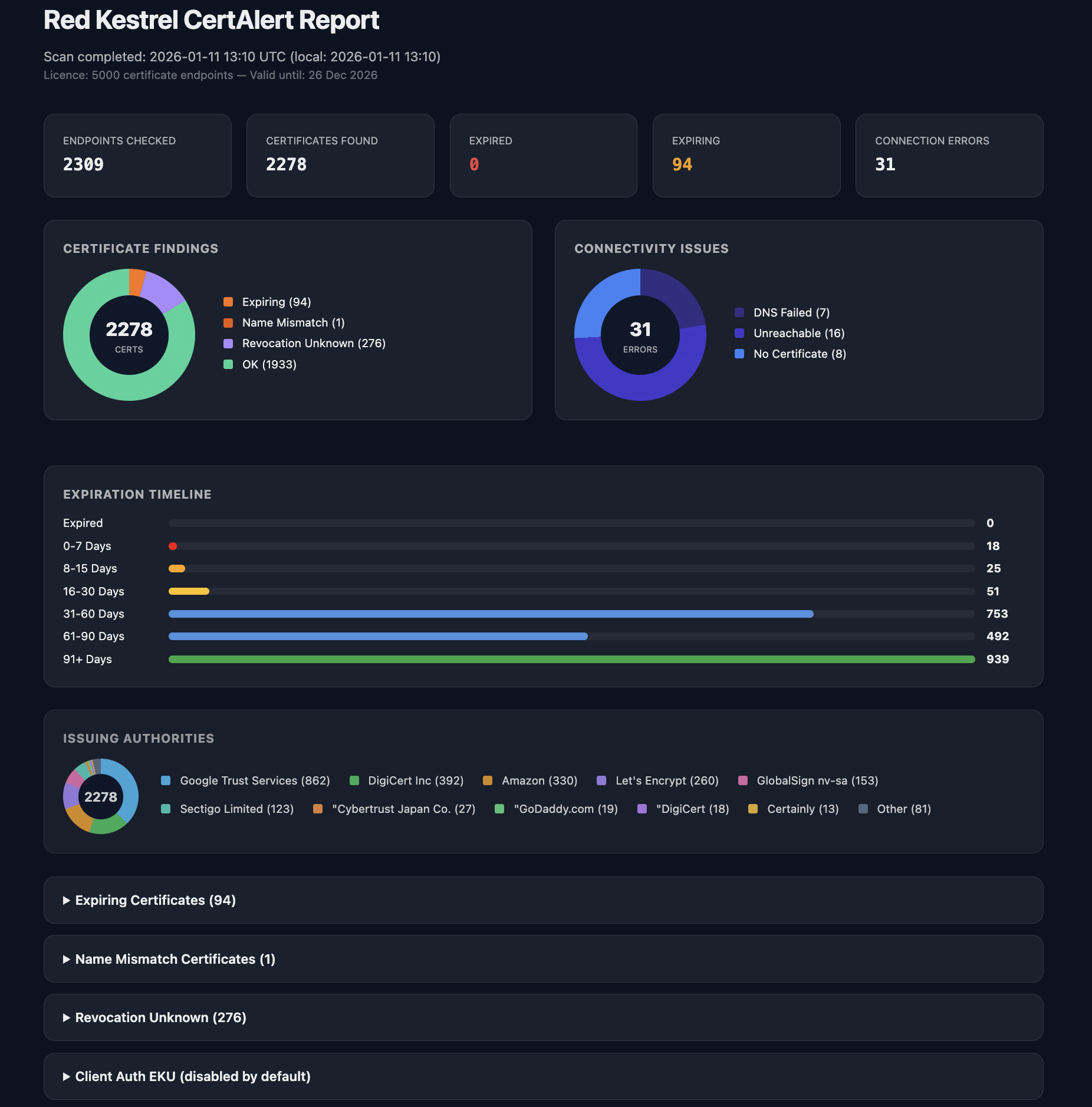
- HTML Reports: Dashboard views with colour-coded status indicators
- Expiry Monitoring: Configurable alerts with cooldown to prevent alert fatigue
- Trust Chain Analysis: Verify certificate chains against system trust stores
- Revocation Checking: Online CRL/OCSP verification
- Security Analysis: Detect weak keys, deprecated algorithms (SHA-1, MD5), and TLS < 1.2
- Protocol Coverage: HTTPS, LDAPS, POP3S, IMAPS, SMTPS, and more
- STARTTLS Support: Auto-detected for SMTP (25, 587), IMAP (143), POP3 (110)
- JSON Configuration: Modern, flexible configuration via config.json
- Scheduled Execution: Windows Task Scheduler or cron integration
- Configurable Concurrency: Adjustable parallel task limits to control network load and avoid triggering IDS/IPS rate-limiting
- Customizable Timeouts: User-defined connection and handshake timeouts for high-latency or slow-response environments
- Exit Code Support: Returns standard integer exit codes for seamless integration into automation scripts and CI/CD pipelines
CertAlert generates three report formats: an HTML report with dashboard views, a detailed CSV report for data analysis, and a summary PDF report. The HTML report provides at-a-glance visibility with colour-coded status indicators.
Reports highlight certificates requiring attention — including expiry risk, trust chain issues, protocol weaknesses, and cryptographic problems. CSV reports enable integration with other enterprise systems and spreadsheet analysis.
CertAlert assigns statuses based on certificate validity, trust, security, and connectivity. Statuses are listed below in descending order of severity.
| Status | Meaning | Action |
|---|---|---|
REVOKED |
Certificate revoked by CA | Replace certificate immediately |
EXPIRED |
Certificate has expired | Renew immediately |
NAME_MISMATCH |
Hostname doesn't match CN/SAN | Replace with correct certificate |
NOT_YET_VALID |
Certificate validity not started | Wait or replace certificate |
SELF_SIGNED |
Certificate is self-signed | Replace with CA-issued certificate |
UNTRUSTED_ROOT |
Root CA not in trust store | Add CA to trust store or use public CA |
CHAIN_BUILD_FAILED |
Chain incomplete | Ensure server sends full chain |
INSECURE_PROTOCOL |
TLS version below 1.2 | Configure server to require TLS 1.2+ |
WEAK_KEY |
RSA < 2048-bit, DSA, or unsupported curves | Replace with stronger key |
WEAK_SIG |
SHA-1 or MD5 signature | Replace with SHA-256+ signature |
EXPIRING |
Expires within threshold (default 30 days) | Schedule renewal |
OK |
Valid certificate, not expiring soon | None required |
Connection Statuses
Connection statuses indicate that no certificate was retrieved:
| Status | Description | Likely Cause |
|---|---|---|
DNS_FAIL |
DNS resolution failed | Typo in hostname, server decommissioned |
UNREACHABLE |
No response from IP | Host offline, firewall blocking, no route |
CLOSED |
Received TCP RST (reset) | Service not running, wrong port |
NO_CERT |
TCP connected but TLS failed | Non-TLS service, TLS misconfigured |
CertAlert's CSV reports contain comprehensive certificate data for analysis and integration with other enterprise systems:
| Column | Description |
|---|---|
| hostname | Server hostname or IP address |
| ip_address | Resolved IP address |
| port | Port number |
| connection_error | Network error details (timeout, connection refused, etc.) |
| tls_version | Negotiated TLS version |
| common_name | Certificate subject CN |
| subject_dn | Full subject distinguished name |
| sans | Subject Alternative Names (DNS names, IPs) |
| issuer_org | Certificate issuer organisation |
| issuer_dn | Full issuer distinguished name |
| valid_from | Certificate validity start date (YYYY-MM-DD) |
| expiry_date | Certificate expiry date (YYYY-MM-DD) |
| days_to_expiry | Days until expiry (negative if expired) |
| lifetime_days | Certificate validity period in days |
| expiration | Expiry status: EXPIRED, EXPIRING, OK, or empty |
| key_type | Public key algorithm (RSA, ECC, etc.) |
| key_size | Key size in bits |
| signature_algorithm | Certificate signature algorithm |
| key_usage | Key usage flags (e.g., DigitalSignature, KeyEncipherment) |
| extended_key_usage | Extended key usage (e.g., Server Authentication) |
| serial | Certificate serial number (hex) |
| sha256_fingerprint | SHA-256 fingerprint (hex) |
| chain_result | Chain validation result (TRUSTED, UNTRUSTED_ROOT, etc.) |
| chain_error_detail | Detailed chain diagnostics with certificate CNs |
| status | Overall certificate status |
| issues | All detected issues (e.g., SELF_SIGNED, WEAK_KEY) |
CertAlert runs from the command line. The console provides real-time feedback with colour-coded status indicators during scanning.
CertAlert can be run manually, scripted, or scheduled for continuous monitoring. Email alerts use cooldown periods to prevent alert fatigue when running frequent scans.
To get started, visit our Quick Start Guide for step-by-step instructions.
Security Note
CertAlert runs locally within your secure environment — no certificate data leaves your network unless you configure external email.
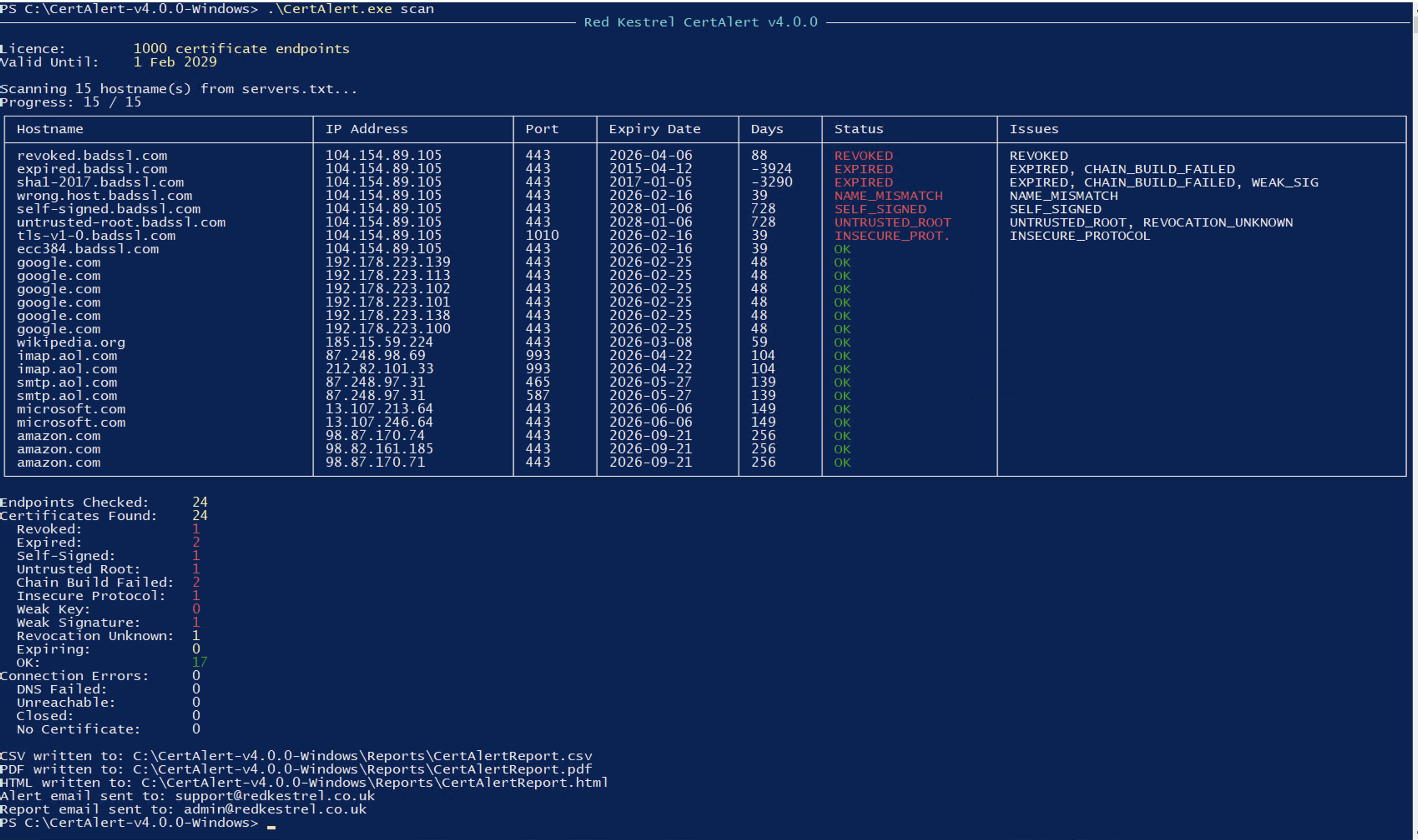
CertAlert on Windows
| Windows | Windows 10/11, Server 2016+ |
| Linux | 64-bit, glibc 2.17+ |
| macOS | macOS 13 or later |
| Dependencies | None — CertAlert is self-contained |
For additional information, contact our support team at [email protected]
Ready to secure your certificate infrastructure?
Get started with CertAlert today and prevent costly certificate-related outages.
Start Monitoring NowCertAlert
Self-contained, cross-platform certificate monitoring with HTML reports and IPv6 support.
Get CertAlert Now